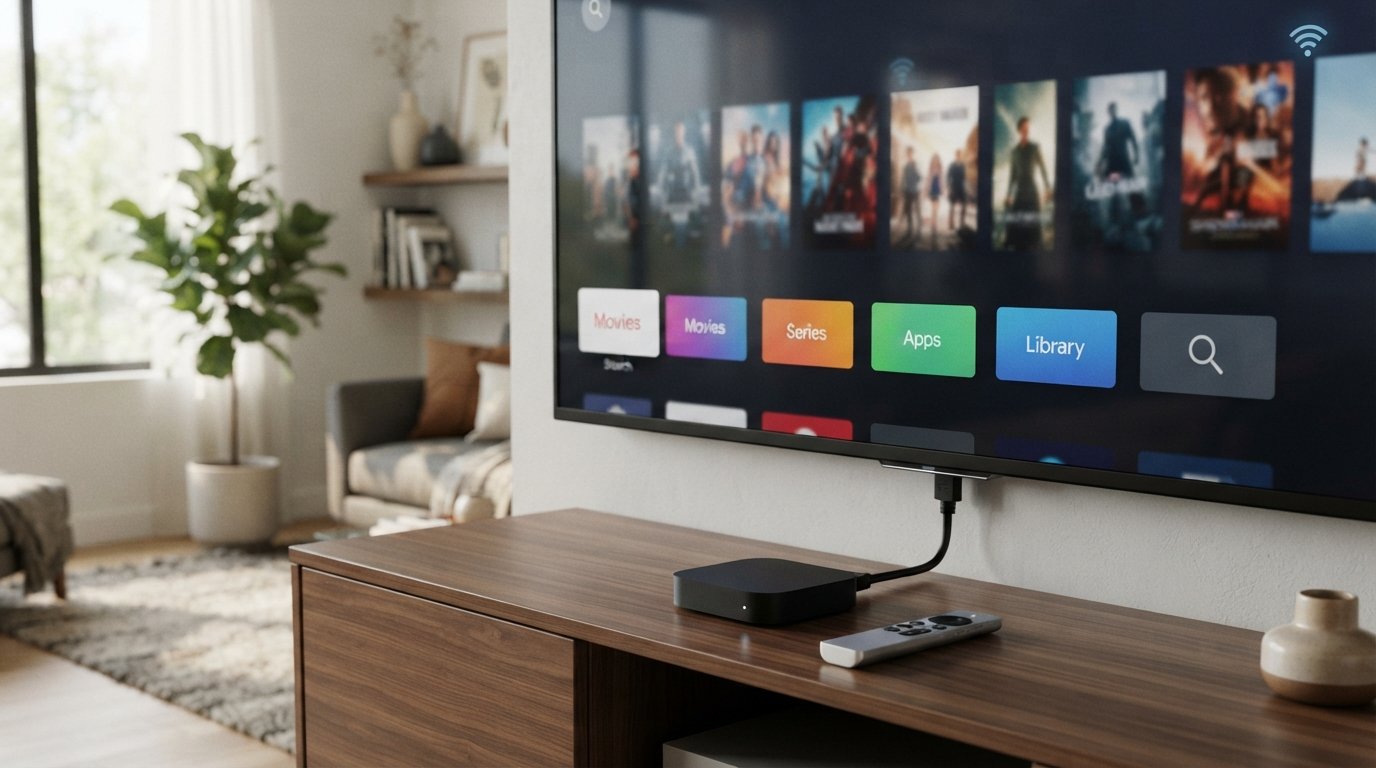
A smart TV box is a small external device that connects to a television, usually through HDMI, and adds internet-connected features such as streaming apps, media playback, and other smart functions. Depending on the device and operating system, it may also support casting, games, voice control, and app downloads.
In simple terms, a smart TV box can give a compatible regular TV many of the features people associate with a smart TV—without replacing the television itself.
What Is a Smart TV Box?
A smart TV box is a compact streaming and media device designed to connect to a TV.
The box usually connects to the television through an HDMI cable. It then uses its own operating system, processor, memory, and internet connection to run supported apps and services.
Depending on the model, a TV box may allow you to:
- Stream movies and TV shows
- Watch YouTube and other video services
- Install supported apps
- Play games
- Cast content from a phone
- Play locally stored photos, music, and videos
- Use voice search or voice assistants
- Connect accessories through Bluetooth or USB
- Access internet-based entertainment
Google TV and Android TV devices, for example, can provide access to apps and content through Google Play, while available features vary by device and region.
The important point is that a smart TV box is separate hardware. Instead of having all the smart features built into the television, the external box provides them.
How Does a Smart TV Box Work?
The basic process is straightforward:
TV → HDMI → Smart TV Box → Internet → Apps and content
First, you connect the box to the television using HDMI. The box also needs power, normally through a separate power adapter.
You then connect the device to the internet through Wi-Fi or, on supported models, Ethernet.
Once connected, the box’s operating system provides an interface where you can open apps, search for content, adjust settings, and use other supported features.
A typical setup involves:
- Connecting the box to power.
- Connecting it to the TV’s HDMI port.
- Turning on the television.
- Selecting the correct HDMI input.
- Pairing the remote if required.
- Connecting the box to Wi-Fi or Ethernet.
- Signing into the relevant account.
- Installing or opening supported apps.
- Choosing the content you want to watch.
This is why the device can be useful for an older television that has an HDMI input but lacks modern streaming functionality.
What Can You Do With a Smart TV Box?
The exact capabilities depend on the hardware, operating system, apps, and region, but common uses include the following.
Stream Movies and TV Shows
A supported TV box can provide access to streaming applications.
However, owning the device does not automatically give you subscriptions to paid services. You generally need an account or subscription where the service requires one. Google also recommends linking only streaming services that you actually subscribe to when configuring Google TV recommendations.
Watch YouTube
YouTube is one of the most common uses for a connected TV device.
Instead of watching videos on a phone or computer, you can use the television’s larger screen.
Install Apps
Supported Android TV and Google TV devices can provide access to apps through Google Play, although available apps can differ according to the device and country.
Cast From a Phone
Some devices support casting, allowing compatible content from a phone or tablet to appear on the TV.
Google’s TV ecosystem also supports using the Google TV app as a remote and casting compatible content when devices are connected appropriately.
Play Games
Some TV boxes can run games designed for their operating system. Performance depends heavily on the processor, graphics hardware, available memory, controller support, and the particular game.
Play Local Media
Depending on its ports and software, a TV box can also be used to access locally stored videos, photos, and music from supported USB storage or network sources.
What Are the Main Features of a Smart TV Box?
Not every box has the same specifications, so it is useful to understand the major features before buying one.
HDMI Output
HDMI is the standard connection used to send video and audio from the box to a compatible television.
If your TV does not have a compatible input, you may need additional equipment, and compatibility can become more complicated.
Wi-Fi
Wi-Fi allows the box to connect to your home network without an Ethernet cable.
This is especially convenient when the television is located away from your router.
Ethernet
Some larger TV boxes include an Ethernet port.
A wired connection can be useful when you want a direct network connection or when Wi-Fi performance is unreliable.
Bluetooth
Bluetooth can allow the box to communicate with compatible remotes, headphones, game controllers, keyboards, and other accessories.
USB Ports
Some boxes include USB ports for compatible external storage and accessories.
The number and type of ports vary significantly between models.
4K and HDR Support
Some modern TV boxes support higher-resolution video and HDR formats.
However, seeing 4K on a specification sheet does not mean every service or video will automatically play in 4K. The television, content service, app, internet connection, device, and subscription may all affect the final experience.
Voice Control
Some Google TV and Android TV devices support voice search and Google Assistant functionality.
Can a Smart TV Box Make a Normal TV Smart?
Yes, in many cases.
If your television has a suitable HDMI input, a compatible smart TV box can add internet-connected entertainment features that weren’t built into the TV.
For example, an older LCD television may still have an excellent display but lack modern streaming software. Adding an external streaming device can provide a newer interface and access to supported apps.
But there is an important distinction:
The TV itself has not become a smart TV internally.
Instead, the external box is supplying the smart functionality.
Think of it as adding a small computer designed for television use rather than replacing the entire TV.
Smart TV Box vs. Smart TV
The biggest difference is where the smart technology is located.
| Feature | Smart TV | Smart TV Box |
|---|---|---|
| Smart hardware | Built into TV | External device |
| Internet connection | Built in | Through the box |
| HDMI required | Not for internal smart features | Usually yes |
| Can upgrade an older TV | No | Often yes |
| Easy to replace/upgrade smart platform | Usually limited | Usually easier |
| Requires separate device | No | Yes |
| Uses TV’s display | Yes | Yes |
A smart TV combines the display and smart platform in one television.
A smart TV box keeps the television and smart platform separate.
This separation can be useful if you already own a good TV but don’t like its built-in software.
Smart TV Box vs. TV Stick: What’s the Difference?
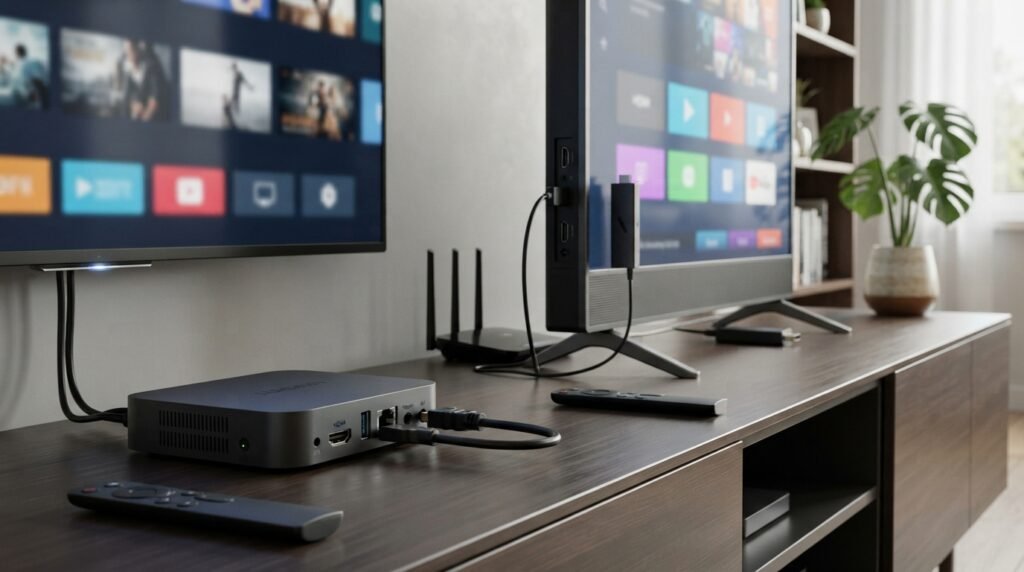
A TV stick performs a similar basic job but is generally much smaller.
A traditional TV box usually has more physical space for ports and may offer connections such as USB and Ethernet.
A TV stick is designed to be compact and typically connects directly to an HDMI port, although it still needs power.
Smart TV Box
- Larger physical design
- Often more ports
- May offer Ethernet
- More suitable for external accessories
- Usually easier to expand with compatible peripherals
TV Stick
- Smaller
- Easy to carry
- Minimal cable clutter
- Usually fewer physical ports
- Convenient for basic streaming
Neither format is automatically better.
The right choice depends on whether you prioritize portability and simplicity or connectivity and expandability.
What Is an Android TV Box?
An Android TV box is a TV box that uses Android-based TV software or another Android-derived platform.
However, it is important not to assume that every product advertised as an “Android box” is an officially certified Android TV or Google TV device.
This distinction matters because software support, app compatibility, updates, DRM, and streaming quality can vary considerably between devices.
Some current 2026 guides specifically warn consumers to pay attention to certification when choosing an Android TV box.
So, rather than judging a device only by the words “Android TV box” on its packaging, check:
- operating system
- certification
- supported apps
- software updates
- processor
- RAM
- storage
- video formats
- connectivity
- manufacturer support
Android TV vs. Google TV: Are They the Same?
They are closely related, but the names do not mean exactly the same thing.
Android TV OS is the underlying television operating system used by compatible TVs and streaming devices.
Google TV is a newer personalized experience/interface that runs on Android TV OS.
Google explicitly explains that Google TV is powered by Android TV OS, while some devices use Android TV OS without the Google TV interface.
So you shouldn’t automatically treat Android TV and Google TV as two completely separate operating systems.
The practical difference is often the user interface, content discovery, recommendations, and the way the system organizes apps and entertainment.
Does a Smart TV Box Need Wi-Fi?
Usually, yes, if you want to use online features.
Streaming services, online apps, web-based content, software downloads, and many connected features require an internet connection.
A TV box may connect through:
- Wi-Fi
- Ethernet
- another supported network connection
However, an internet connection isn’t necessarily required for every function.
For example, some devices can play compatible local media from connected storage without being online. Google’s own documentation also notes that certain Google TV devices can operate in a limited basic mode without an internet connection, although many features become unavailable.
How to Set Up a Smart TV Box
Setting up a typical smart TV box is relatively simple.
Step 1: Connect the Power
Plug the box’s power adapter into the device and a suitable power outlet.
Step 2: Connect HDMI
Connect one end of the HDMI cable to the TV box and the other to an available HDMI input on your television.
Step 3: Select the HDMI Source
Turn on the TV and select the HDMI input where you connected the box.
Step 4: Pair the Remote
Follow the on-screen instructions for pairing the included remote if required.
Step 5: Connect to the Internet
Choose your Wi-Fi network and enter its password, or connect Ethernet if the box supports it.
Step 6: Sign In
Depending on the platform, you may be asked to sign in to a Google account or another account.
Step 7: Install Your Apps
Install the supported streaming and entertainment applications you want to use.
Step 8: Start Using the Device
Once setup is complete, you can open apps, search for content, adjust settings, and customize the experience.
The exact screens and setup process differ between manufacturers and operating systems.
What Are the Benefits of a Smart TV Box?
1. It Can Extend the Life of an Older TV
If your existing TV still has a good display but outdated software, an external device can provide a newer entertainment platform.
2. It Can Be Cheaper Than Replacing a TV
You don’t necessarily need to purchase an entirely new television just to gain streaming functionality.
3. It Can Be Replaced Separately
If the external streaming device becomes outdated, you can replace that device without necessarily replacing the television.
4. It Can Offer More Connectivity
Some boxes provide ports and connections that aren’t available on every TV.
5. It Can Provide a Familiar Interface
A supported Google TV or Android TV device can provide an ecosystem for apps, content discovery, recommendations, and other connected features.
What Are the Limitations of a Smart TV Box?
A smart TV box isn’t a magical upgrade for every television.
It Needs a Compatible TV
Most modern boxes rely on HDMI. Very old televisions without suitable inputs may require additional adapters or may not be practical to use.
It Still Depends on the Internet for Online Content
A faster box cannot compensate for an unreliable internet connection when the problem is network performance.
Apps Are Not Guaranteed on Every Device
Different platforms and regions can have different app availability.
Paid Services Still Require Subscriptions
Buying a box does not automatically unlock subscription-based streaming services.
Cheap Generic Devices Can Be Risky
Low-cost products may have weak software support, questionable certification, limited updates, or poor compatibility.
Hardware Matters
A box with insufficient memory or a weak processor can provide a frustrating experience even if its packaging advertises impressive features.
What Should You Look for When Buying a Smart TV Box?
Don’t choose a TV box based solely on the cheapest price.
Consider these factors first.
1. Operating System
Find out exactly which operating system and interface the device uses.
2. Certification
If you need major streaming services, check whether the device is appropriately certified and officially supported for those services.
3. Processor and RAM
These affect navigation, multitasking, app performance, and general responsiveness.
4. Storage
More storage can be useful if you plan to install numerous apps or store compatible media locally.
5. Video Support
Check whether the device supports the resolution and HDR formats you actually need.
6. Wi-Fi and Ethernet
Choose connectivity based on how far your TV is from the router and how stable your wireless network is.
7. Ports
USB, Ethernet, HDMI, and other connections can matter if you plan to attach external devices.
8. Software Updates
A device that receives ongoing updates can be a better long-term choice than hardware with little or no manufacturer support.
9. Remote Control
A good remote can make a surprisingly large difference to everyday usability.
10. Manufacturer Reputation
Look for a manufacturer that provides clear specifications, support information, and software updates.
Is a Smart TV Box Worth It?
A smart TV box can be worthwhile if you:
- own an older TV with HDMI
- want modern streaming features
- prefer an external operating system
- want to upgrade without replacing the display
- want more flexibility than your TV’s built-in software provides
- need a separate streaming device for another television
You may not need one if your current smart TV already provides all the apps, performance, and features you want.
In that situation, buying another device could simply add cost and another remote without solving a real problem.
The better question isn’t “Are smart TV boxes useful?”
It’s:
“Does an external streaming platform provide something my current TV doesn’t?”
Are Smart TV Boxes Safe to Use?
The device itself isn’t automatically safe or unsafe simply because it is called a TV box.
The main concern is where the device comes from and what software it uses.
A reputable device with proper software support, regular updates, and appropriate certification is generally a more sensible choice than an unknown box offering unrealistic claims.
Be particularly cautious about devices advertised with promises of unlimited premium content, unusually low prices, or access to services that normally require legitimate subscriptions.
Also keep the device updated whenever the manufacturer provides security or software updates.
Can You Use a Smart TV Box Without a Smart TV?
Yes.
That’s one of the main reasons these devices exist.
A television does not need to have built-in smart features if it has a compatible connection—normally HDMI—and the TV box can provide the necessary external software and processing.
So an older compatible LCD or LED television can potentially be paired with a streaming box and used for internet-connected entertainment.
Frequently Asked Questions
1. What is a smart TV box used for?
A smart TV box is mainly used to add connected entertainment features to a television. Depending on the device, it can provide streaming apps, media playback, games, casting, voice functions, and other smart features.
2. Can a smart TV box make a normal TV smart?
It can give a compatible normal TV many smart-TV-style capabilities, especially when the television has HDMI. The smart functionality comes from the external box rather than from the television itself.
3. Does a smart TV box need internet?
An internet connection is normally required for streaming and online applications. Some local-media features can work without internet access, depending on the device and software.
4. Can I watch Netflix on a smart TV box?
That depends on the specific device, operating system, certification, region, and Netflix support. Don’t assume that every inexpensive Android box provides the same streaming experience.
5. Can I install apps on a smart TV box?
Supported Android TV and Google TV devices can allow users to download compatible apps through Google Play. App availability varies by device and region.
6. Is an Android TV box the same as a smart TV box?
Not necessarily. Smart TV box is a broader description for an external device that adds connected functionality to a TV. Android TV box generally refers to one using Android-based TV software.
7. What is the difference between a TV box and a TV stick?
Both can provide streaming functionality, but a TV stick is smaller and usually designed for minimal connections, while a TV box tends to offer more physical ports and connectivity options.
8. Is Google TV the same as Android TV?
Google TV is a personalized TV experience built on Android TV OS. Some devices use Android TV OS without the Google TV interface.
9. Can a smart TV box replace cable TV?
It can provide internet-based entertainment, but it doesn’t automatically replace every cable or satellite service. What you can watch depends on the legitimate apps and services supported by the device.
10. Can a smart TV box connect to Wi-Fi?
Yes. Wi-Fi is a standard connection method on many modern TV boxes, although supported networking options differ by model.
Conclusion
A smart TV box is an external streaming and entertainment device that connects to a television and adds connected features such as apps, online streaming, media playback, and, on some models, casting, gaming, and voice control. Its biggest advantage is flexibility. If your television still works well but its built-in software is limited or nonexistent, a suitable external device can provide a newer entertainment platform without requiring you to replace the entire TV.
However, not all TV boxes are equal. Before buying one, pay attention to operating system, certification, app compatibility, hardware, connectivity, video support, software updates, and manufacturer support. For most users, the best choice isn’t simply the box with the longest feature list. It’s the one that reliably supports the apps and features they actually need.
Related Post
- Inurl:Spatial – What It Means, How It Works, and How to Use It!
- Countries In Middle Eastern – Complete List, Capitals, Regions & Key Facts!
- Click For Net – What It Is, How It Works, Safety, SEO Value & What Users Should Know!
About the Author






1 thought on “What Is A Smart Tv Box – How It Works, Features, Benefits, and More!”