If you have searched for TxMyZone, you may have encountered several conflicting descriptions of what the platform actually is. Some websites describe it as a general digital workspace, while others associate the name with payment services, social applications, or productivity software.
The strongest available evidence points in a different direction.
txMyZone is associated with the Texas education technology ecosystem and the TxEIS school administration system. It is used by participating Texas educational organizations as part of a broader collection of tools for managing student and school information. Public school and Education Service Center references provide much stronger evidence for this interpretation than generic third-party descriptions.
This guide explains what TxMyZone is, who uses it, what it can be used for, how access generally works, and how to avoid confusion with unrelated websites using similar terminology.
What Is TxMyZone?
TxMyZone is an online access point associated with TxEIS, the Texas Enterprise Information System, also known as ASCENDER.
The system is used by Texas schools and educational organizations for administrative and student-related functions. Public references place txMyZone alongside related tools such as txConnect and txGradebook.
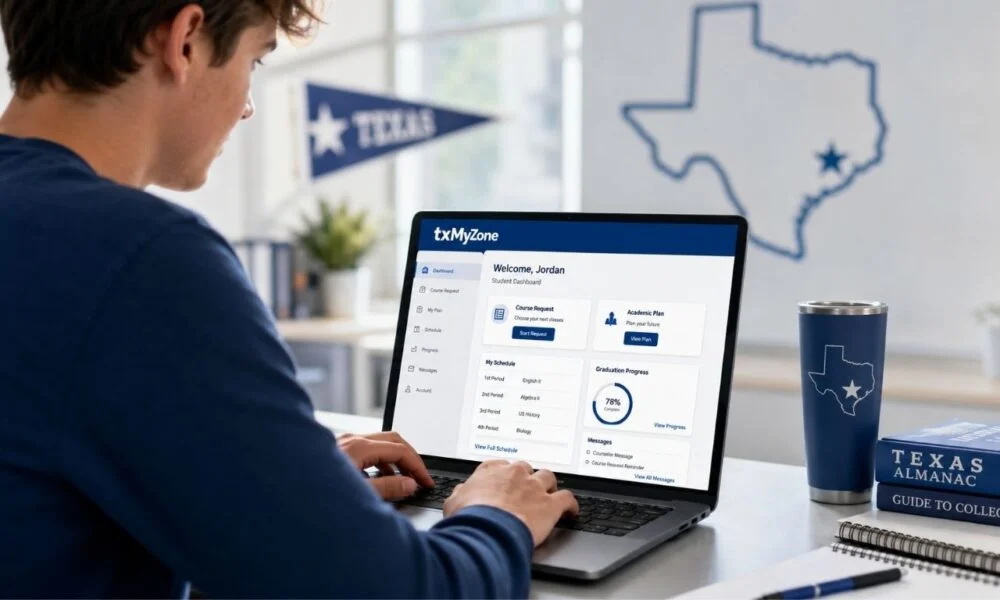
Depending on the school or district, the information available through the system can include academic records, schedules, course planning, attendance information, and other education-related data.
Because individual districts configure and use educational systems differently, the exact features available to a student or parent can vary.
What Is TxEIS and How Is It Related to TxMyZone?
Understanding TxEIS makes the purpose of TxMyZone easier to understand.
TxEIS is a web-based school administration system associated with Texas Education Service Centers. It supports administrative and reporting functions for educational organizations.
TxMyZone is one of the access points or components associated with this wider ecosystem.
Other tools may serve different purposes. For example, txGradebook is associated with grade-related information, while txConnect can provide another interface for school-related information and communication.
The important point is that these names should not automatically be treated as separate commercial companies or unrelated consumer applications.
Who Uses TxMyZone?
The real-world users can depend on the participating district or school.
Potential users include:
- Students
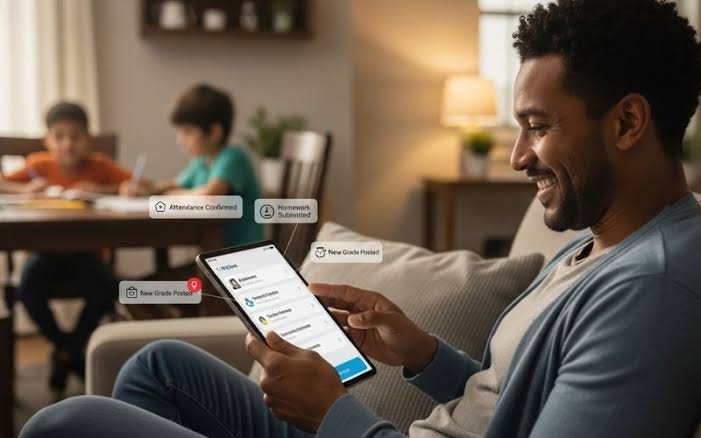
- Parents and guardians
- Teachers
- School counselors
- Administrative staff
- Other authorized education personnel
For example, public school websites can place TxMyZone among their student and staff resources. Eastland ISD is one example cited in current public references.
Access is normally controlled by the organization providing the account.
That means a person cannot necessarily create an account independently and expect to access a school district’s records.
What Can Students Use TxMyZone For?
The available functions depend on the district and the specific configuration, but educational uses can include several important tasks.
Course Planning
Students may use an associated system to review or submit course requests.
Course planning is particularly important during registration periods when students are selecting classes for upcoming terms or school years.
Schedule Information
Students may be able to review their current or upcoming class schedules.
This can make it easier to confirm subjects, periods, teachers, and other school-related details.
Academic Information
Connected systems can provide access to academic information such as grades or progress.
The exact information displayed depends on the district’s implementation and which connected services are enabled.
Attendance
Some school information systems allow authorized users to review attendance records.
Parents and students can use these records to understand absences, tardies, or other attendance information when the district provides that functionality.
Graduation and Course Planning
For older students, education-management systems may help with course planning and progress toward graduation requirements.
The specific tools available should always be confirmed through the student’s school or district.
How Does TxMyZone Login Work?
The safest way to access TxMyZone is through a school or district-provided link.
Avoid choosing a random login page from a search result when the page asks for sensitive student or account information.
A typical access process may look like this:
- Open your school’s official website.
- Locate the student, parent, or online-services section.
- Select the TxMyZone or relevant TxEIS/ASCENDER link.
- Enter the credentials supplied by your school or district.
- Complete any required authentication steps.
- Open the available student or account dashboard.
The exact login screen can differ between organizations.
If your school provides a specific URL, use that URL rather than relying on third-party websites.
What If Your TxMyZone Login Does Not Work?
Login problems do not necessarily mean the system is unavailable.
Common causes include:
- Incorrect username
- Incorrect password
- An expired password
- Account restrictions
- A school or district configuration issue
- Temporary technical problems
- Using the wrong portal
- Attempting to access an account before it has been activated
Start by checking the instructions supplied by your school.
If a password-reset option is available, use the official recovery process. If you cannot recover the account, contact the appropriate school or district office.
Do not provide your password to someone claiming to offer unofficial technical support.
Is TxMyZone Available to Every Texas Student?
No.
TxMyZone should not be assumed to be a universal portal used by every student in Texas.
Different school districts use different technology systems, and participation can vary.
Current public references show TxMyZone associated with numerous Texas school districts and educational organizations, but that does not mean every Texas school uses it.
If you are unsure whether your school uses TxMyZone, check the school’s official website or contact the administration.
Is TxMyZone the Same as txConnect?
They are related to the same broader educational technology environment, but they should not automatically be treated as identical services.
TxMyZone, txConnect, and txGradebook can have different roles within the wider TxEIS/ASCENDER ecosystem.
Which service you should use depends on what your school is asking you to access.
If your school sends you a specific link, use that link rather than guessing which portal is appropriate.
Is TxMyZone the Same as a Productivity App?
There is no strong evidence that the verified Texas educational version of TxMyZone is a generic productivity platform.
Some recent websites describe TxMyZone as a digital workspace for task management, workflow organization, or personalized online experiences. Those descriptions appear to be separate interpretations rather than evidence of the documented Texas school system.
This distinction is important because search results can combine unrelated uses of the same name.
Is TxMyZone a Payment Platform?
There is also no reliable evidence in the sources reviewed that the verified TxMyZone educational system is a peer-to-peer payment platform.
If a website using the TxMyZone name asks you for banking information, payment details, or financial credentials, do not assume that it is connected to a Texas school system.
Verify the website through your school or district before providing any sensitive information.
Is TxMyZone Safe to Use?
The safety of any online portal depends partly on whether you are using the correct official website.
For students and parents, the safest practices are:
- Start from your school’s official website.
- Confirm the domain before entering credentials.
- Look for HTTPS.
- Never share your password.
- Avoid unofficial login links.
- Do not download unknown software claiming to be required for access.
- Report suspicious messages to your school.
- Use official password-recovery procedures.
The existence of a website with the word “TxMyZone” in its name does not automatically establish that it is affiliated with a school district.
Why Are There So Many Conflicting TxMyZone Articles?
The keyword has become confusing because multiple websites have published articles assigning completely different meanings to the same name.
For example, some pages describe TxMyZone as a student portal, while others call it a general digital platform or personalized online environment.
The problem is that a descriptive article does not necessarily prove that a service actually exists in the form being described.
Primary evidence is more useful.
School district websites and Education Service Center references provide a verifiable connection between txMyZone and Texas education administration systems.
What Information Should You Verify Before Logging In?
Before entering credentials, check four things.
1. The Organization
Does the link come from your school district?
2. The Domain
Does the address match the official organization or a recognized service provider?
3. The Purpose
Does the page describe the educational service you were instructed to use?
4. The Information Requested
Be cautious if a supposed school portal unexpectedly asks for unnecessary financial information, payment details, or unrelated personal data.
These simple checks can help distinguish a legitimate school resource from an unrelated website.
Frequently Asked Questions
1. What is TxMyZone?
TxMyZone is associated with the Texas education technology environment and the TxEIS/ASCENDER school administration ecosystem. It is used by participating educational organizations to provide authorized users with access to school-related information and services.
2. Is TxMyZone a student portal?
It can function as a student-facing access point within participating school systems. The exact information and tools available depend on the school or district.
3. Who can access TxMyZone?
Authorized students, parents, teachers, counselors, and school staff may have access depending on the participating organization and their assigned role.
4. How do I log in to TxMyZone?
Use the link supplied by your school or district. Enter the credentials provided to you and follow the organization’s authentication or recovery instructions.
5. What should I do if I forget my password?
Use the official password-recovery process provided by your school or district. If self-service recovery is unavailable, contact the appropriate school administrator.
6. Is TxMyZone used throughout Texas?
It is used by participating Texas educational organizations, but it should not be assumed that every school district uses it. Confirm availability with your school.
7. Is TxMyZone the same as TxEIS?
Not exactly. TxEIS is the broader Texas Enterprise Information System environment, while TxMyZone is associated with the user-facing educational services within that ecosystem.
Final Thoughts
TxMyZone is associated with Texas school administration and educational systems, including TxEIS/ASCENDER. Students and parents should access it through their official school or district website and verify login details before entering personal information. Because features may vary by institution, users should follow their school’s instructions to understand available services, account access, communication tools, and administrative resources.
Related Post
- Keine Karriere-Subdomain Gefunden: Causes & Fixes
- Snapjotz com Review: Features, Safety & User Guide 2026
- Adultsrach – Complete Guide to Features, Safety, Privacy, and Online Search Experience!
About the Author